Quick Look for KDE Dolphin
Double-click a supported local file to preview images, PDFs, videos, and audio inline. You can switch activation to Space in Dolphin's View settings.
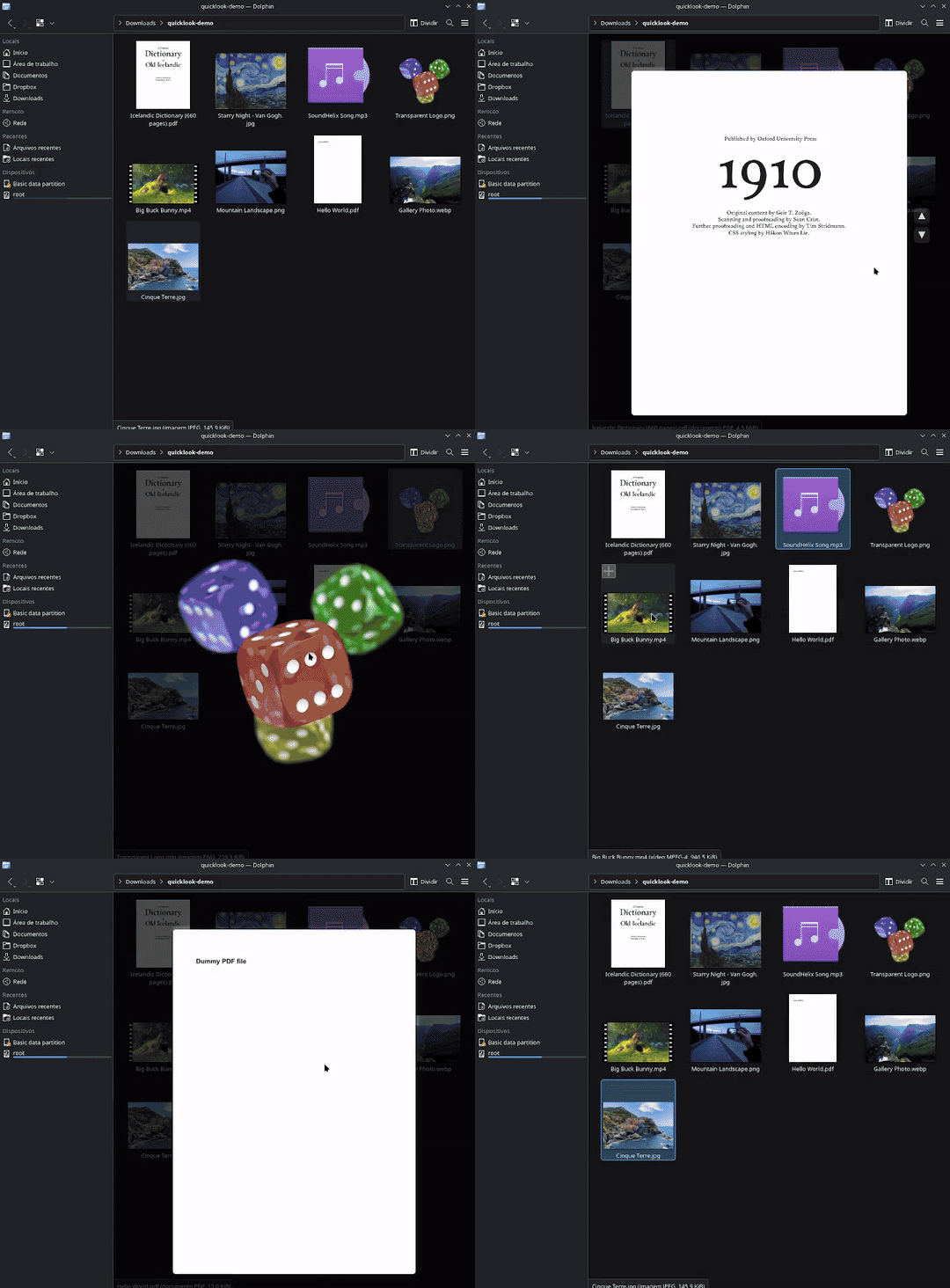
Double-click a supported local file to preview images, PDFs, videos, and audio inline. You can switch activation to Space in Dolphin's View settings.
Everything you need for fast file previews, built natively into Dolphin.
Uses the image formats provided by your installed Qt plugins. Optional formats such as AVIF, HEIF, and JPEG XL depend on those plugins; Quick Look does not bundle codecs.
Multi-page navigation, password support, a five-page cache, and asynchronous viewport-sized page rendering through Qt PDF. Local files over 64 MiB are rejected.
MP4, MKV, WebM, AVI, MOV, and more play inline with looping. First frame extracted as thumbnail, playback starts after animation. Uses Qt Multimedia.
MP3, FLAC, OGG, WAV, and more. Rotating vinyl record with groove details and a real-time 48-bar radial FFT spectrum analyzer. Playback time displayed below.
The feature paints through QPainter and does not add an OpenGL path. Dolphin still needs a working Qt graphical session and normal platform support.
DPI-aware text and content rendering with sharp output on 2x/3x displays. No blurry scaling, no workarounds.
Scroll-wheel zoom from 1x to 5x, centered on cursor position. Click-and-drag panning. Right-click to reset. Progressive hi-res re-render at each zoom level.
250ms cubic ease-out open animation, fade-out on close, and crossfades on content switches. A 16ms timer requests frames; actual cadence depends on the system.
Async render generations discard stale results, with active-state and null checks around content changes. This is an experimental patch, not a crash-free guarantee.
Fast, intuitive controls.
The patch targets one pinned Dolphin development commit. Install the matching Qt 6 and KDE Frameworks 6 development dependencies first.
# Clone and install
$ git clone https://github.com/pir0c0pter0/dolphin-quicklook.git
$ cd dolphin-quicklook
$ ./install.sh

# Shallow-fetches the pinned commit, builds, then asks before install.
# JOBS=4 ./install.sh limits parallel compilation.
# /usr is read-only; build in a matching Fedora Toolbx.
$ ./scripts/install-bazzite.sh

# Optional: rebuild from a vetted local snapshot after Dolphin RPM changes.
$ ./scripts/update-bazzite-hook.sh --install
The atomic hook never downloads or executes a mutable Quick Look branch. Update the checkout, review it, then rerun --install to replace its local snapshot. See the
README for exact versions and safe uninstall commands.
An experimental patch for a pinned Dolphin snapshot, not an upstream release or a distribution package.
| Area | Current contract |
|---|---|
| Source | Pinned Dolphin commit b12eada71266…; arbitrary releases and HEAD are unsupported |
| Build minimums | CMake 3.16, Qt 6.4, KDE Frameworks 6.23, C++20 |
| Activation | Double-click one supported local file, or select it and press Space when configured |
| Formats | Depend on optional Qt PDF, Qt Multimedia, image plugins, and system codecs |
| Updates | Pinned upstream source plus an explicitly installed local Quick Look snapshot |
Give your file manager the Quick Look it deserves.